
Give owners visibility and responsibility.
Give managers visibility into their assigned budgets and relevant plan-versus-actual information, while finance retains control of the model.
Why CloudBudget
A budget should do more than record last year's assumptions. CloudBudget connects planning, budget owners, approvals, forecasts and accounting actuals inside Salesforce — so finance can guide the process and managers can act on the numbers.
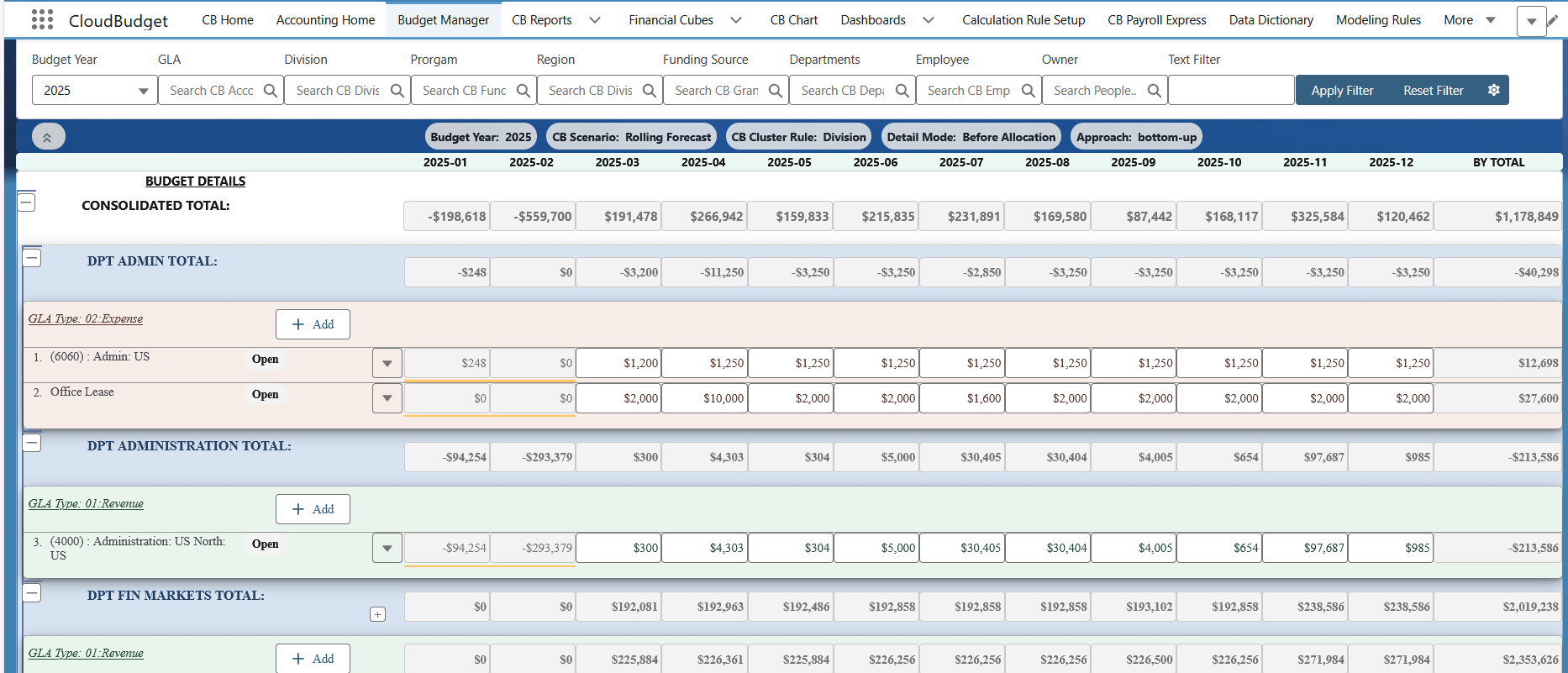
Give managers visibility into their assigned budgets and relevant plan-versus-actual information, while finance retains control of the model.
Keep the approved budget as a benchmark while working versions and forecasts reflect changing expectations.
Bring agreed accounting data into budget, forecast and actual comparisons without replacing the accounting source.
Connect drivers, calculations and allocations to the way your organization plans and reports.
Let department and program managers work with the budgets assigned to them and review relevant plan-versus-actual information. Finance can establish accountability without handing everyone an unrestricted copy of the entire model. Access depends on the configured Salesforce sharing and permission design.
Keep a board-approved or management-approved baseline separate from working versions and updated forecasts. Incorporate accounting actuals for closed periods, adjust assumptions for future periods and compare the latest outlook with the original plan.
Map agreed accounts, periods and planning dimensions from Accounting Seed or other supported sources. Reconcile imported actuals, define how often they refresh and report budget, forecast and actuals together. CloudBudget complements the accounting system; it does not replace it.
Model drivers, calculations and allocations using agreed source data and business rules. A flexible planning structure makes it possible to evolve the model as departments, funds, programs, locations or reporting requirements change, without maintaining a chain of interdependent spreadsheets.
From source data to decisions
Connect agreed accounting and operational inputs to planning, control and management reporting inside Salesforce.
Source of truth
Accounting systems continue to own the financial actuals.
Inside Salesforce
Budget owners prepare plans. Finance manages calculations, allocations, review and approval.
Mapped actuals inform comparison; they are not created by budget approval.
Management view
Review variances and agreed drill-down to support decisions.
Mappings, refresh cadence, reconciliation, source detail and permissions are defined during implementation. This flow does not imply universal connectors or real-time synchronization.
Finance defines the structure and assumptions. Budget owners prepare their numbers.
Assigned reviewers check the plan and resolve questions with its owners.
Retain the approved baseline and apply the agreed locking and access rules.
Compare approved budget, latest forecast and reconciled accounting actuals.
Update future assumptions and the outlook while preserving the approved budget.
The approved budget is your baseline. The latest forecast is your changing outlook. Accounting actuals remain a separate comparison input.
For organizations that need purchase-order or commitment-aware controls, the data flow and enforcement rules must be specifically scoped and implemented. This is an extension opportunity, not a universal out-of-the-box promise.
CloudBudget is built for organizations whose planning models must work with existing financial structures, operational data and Salesforce architecture. Implementation focuses on real budget processes, agreed calculations, reconciliation and training — not simply installing software.

Read full reviewOur experience with CloudBudget has been exceptional, driven by a development team that is professional, patient, and truly knowledgeable in the fields of finance, planning, and accounting.

Read full reviewAs one of CloudBudget's first clients on AccountingSeed, we worked closely with their technical team to ensure that the application was integrating smoothly and producing accurate results for our budget to actual comparisons.

Read full reviewThe ability to track budgets and actuals in one place, fully integrated with Salesforce, has replaced our patchwork of spreadsheets and brought clarity to our financial picture.
Spreadsheets remain excellent tools for analysis. The challenge begins when separate workbooks become the system for collecting, approving, consolidating and revising budgets across an organization.
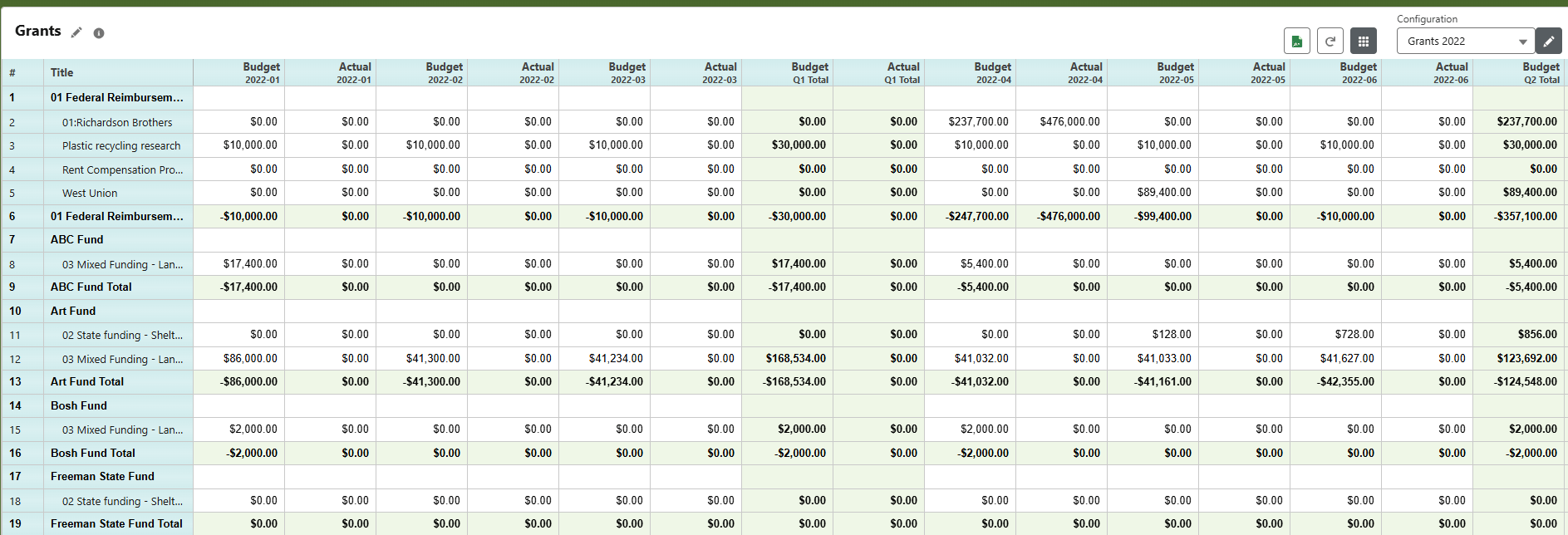
Finance chases versions, checks formulas and spends time reconciling files. Budget owners may only see performance after reports are circulated. Adding new planning dimensions or changing allocation rules can require extensive manual rework.
Budget lines, planning dimensions, versions and permissions live in a governed Salesforce-based model. Teams can prepare, review and revise budgets in a repeatable process while Excel remains available for controlled import, export and analysis.
Tell us how you budget today, which accounting data you rely on and where budget owners need more visibility. We will focus your demo on the workflow most relevant to your organization.