
Product Overview
Bring budgeting, forecasting, and budget control together.
Plan with budget owners, maintain approved budgets and forecasts, and compare plans with accounting actuals inside Salesforce.
Plan, control and review in CloudBudget
Plan
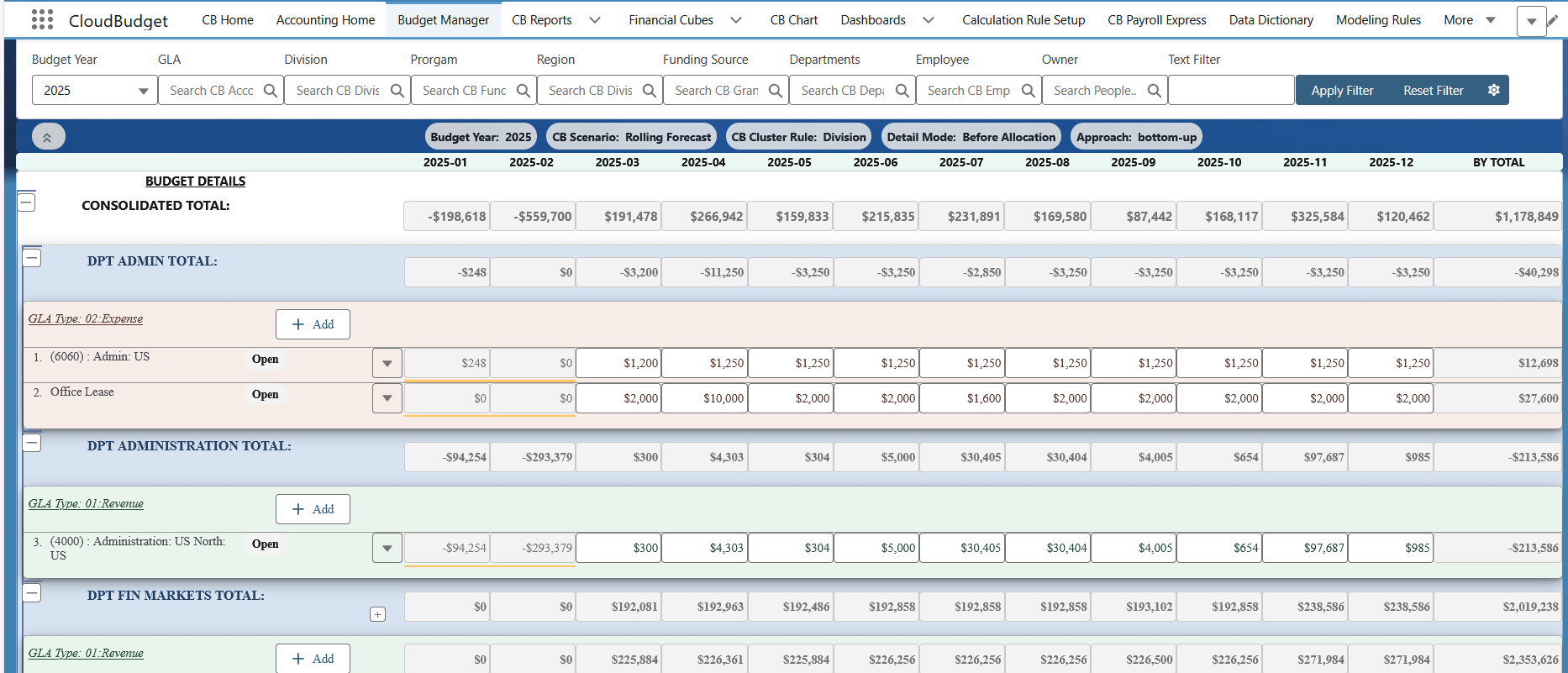
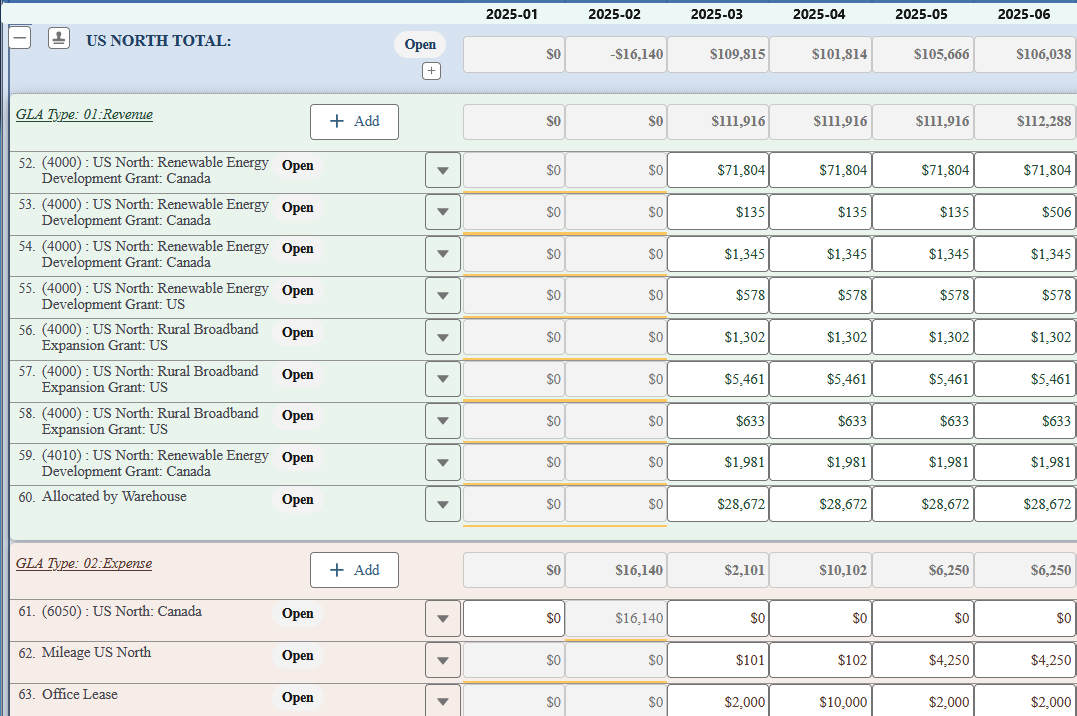
Budget owners enter monthly revenue and expenses by planning dimension. Department and consolidated totals keep the wider plan in view.
Control
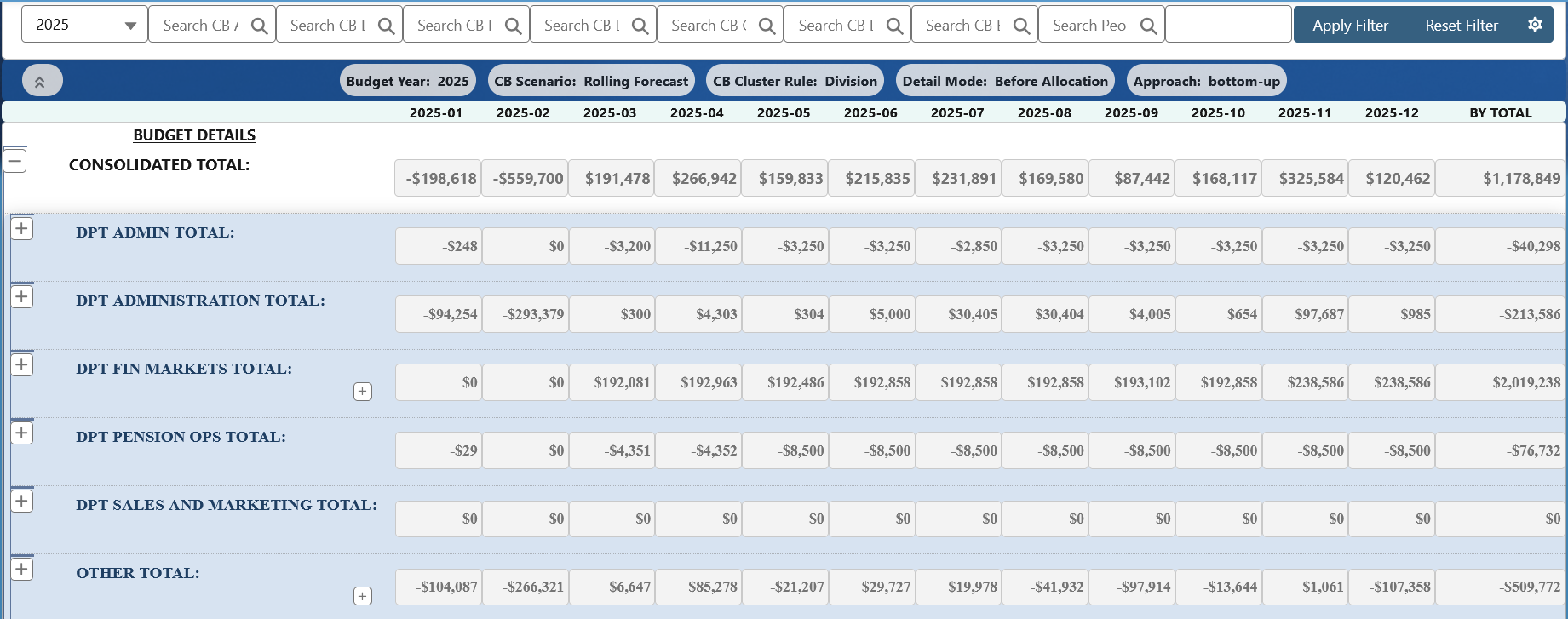
Finance maintains the approved baseline while forecast versions reflect changing assumptions. Review department rollups and consolidated amounts in the Rolling Forecast view shown here.
Review
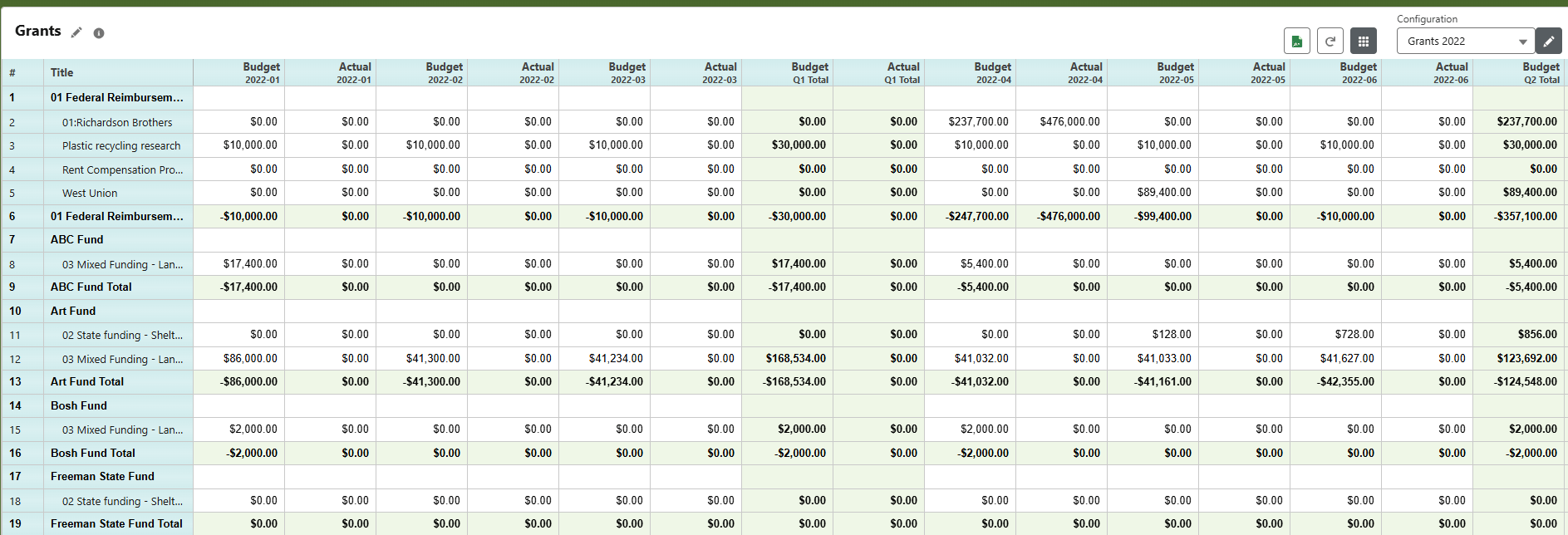
Compare monthly budget and actual amounts in configured financial reports. The approved budget, latest forecast and accounting actuals remain distinct comparison inputs.
Versions and scenarios
Keep the approved budget distinct from the latest forecast.
Prepare the budget in a working version, keep an approved baseline for comparison, and update forecast versions as actuals and assumptions change. Revising the outlook preserves the approved budget.
Configure version lifecycles, locking and what-if scenarios. Department rollups show how individual plans contribute to the organization-wide forecast.
Review and budget control
Make submission and review part of the budget cycle.
Define budget ownership, reviewers and when changes need another review. Configure statuses and permissions to distinguish work in progress from an approved plan.
Test the approval chain and reopening rules with budget owners before go-live, including edit rights and access to sensitive data.
- Prepare
Budget owners enter and revise their assigned lines.
- Review
Reviewers check assumptions and return items that need revision.
- Approve
Finance maintains the approved version and its change rules.
Excel import and export
Keep Excel useful within a controlled planning process.
Export budget templates to Excel and import the edited amounts into CloudBudget. Budget lines, versions and reporting stay in Salesforce while finance uses familiar spreadsheet tools.
Scope template structure, editable fields, validation and access before rollout. Export reports for further analysis and presentation while keeping the budget source of truth in CloudBudget.
Drivers and calculations
Connect financial amounts to the assumptions behind them.
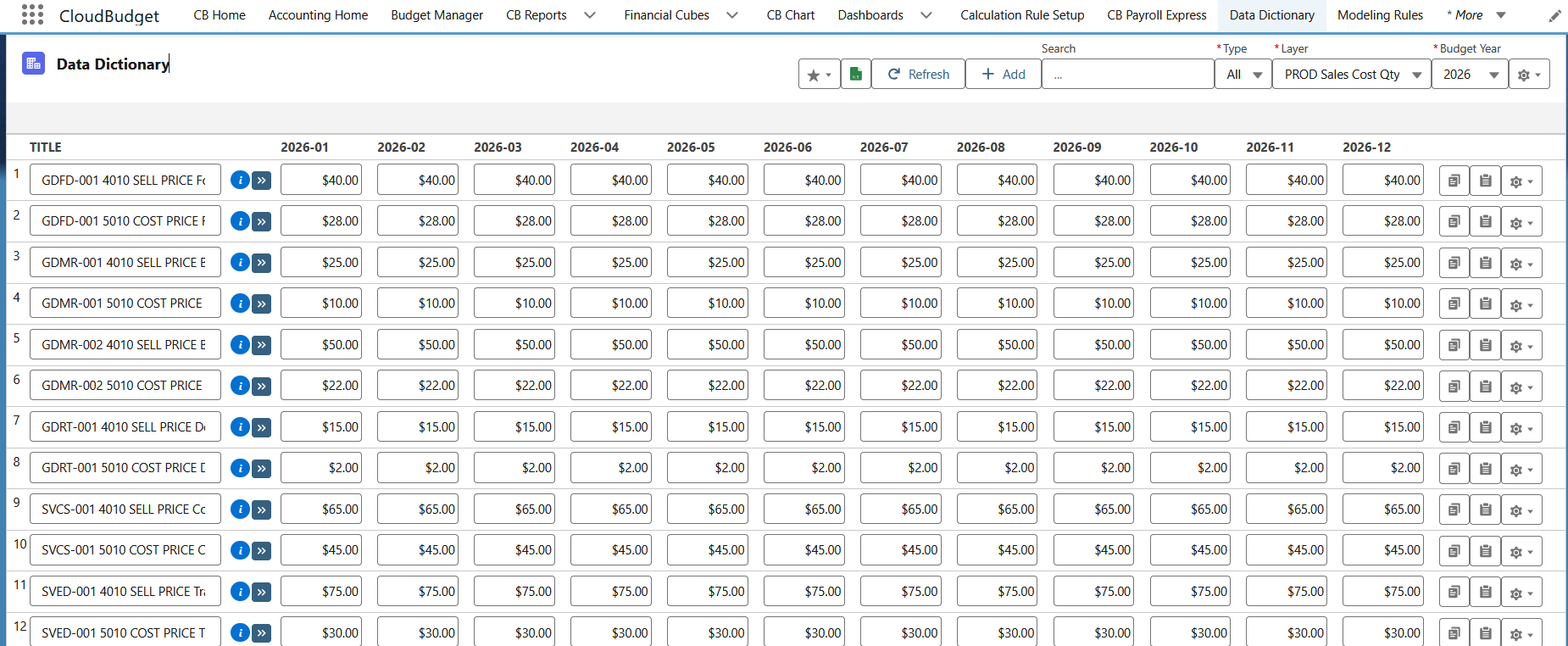
Model revenue as units multiplied by a rate, or a cost as a base amount multiplied by a percentage. Maintain reference assumptions such as prices and cost rates by period, then configure the calculation rules that use them.
Modeling Rules can map source data into budget lines; Calculation Rules derive amounts from defined inputs. Scope the source fields, formula logic and refresh behavior, and reconcile the output against agreed examples rather than assuming every business rule is standard.
Allocations
Distribute shared costs with an agreed basis.
Define the source cost pool, receiving departments or programs, and the driver used to distribute it. Depending on the agreed model, the basis might be headcount, usage, floor area or a percentage split.
Keep allocation inputs and resulting budget lines understandable to finance reviewers. Allocation rules, rounding, timing and exceptions are configuration decisions; test representative cases before relying on the results in an approved budget.
Budget vs. Actuals
Review plans alongside accounting actuals.
Use CB Reports to arrange budget, actual, forecast and variance columns around the questions your finance team needs to answer. Configure account groupings, subtotals and monthly, quarterly or annual views for the intended audience.
Actuals come from the agreed accounting source and mapping. Reconcile them to that source, define the level of drill-down, and scope report exports and dashboard views. The report shown here compares monthly budget and actual amounts grouped by grant.
Payroll Forecast
Bring workforce assumptions into the same financial plan.
Plan employee and position costs using salary, hours, rates and benefits, then allocate those costs to the departments or programs that carry them. Payroll Forecast supports financial planning; payroll processing stays with your payroll system.
Payroll Forecast is included in CloudBudget Pro, CloudBudget for Accounting Seed, and CloudBudget for Nonprofits.
Essential capabilities, without the guesswork.
Buyers often need a quick answer before a demo. The capabilities below are supported by CloudBudget; their configuration, available source detail and integration boundaries depend on the selected solution and implementation scope.
Plan with budget owners
Monthly planning with the dimensions and views your team needs.
Preserve the baseline
Working versions and forecasts alongside the approved budget.
Control review and access
Agreed responsibilities, approvals, locking and visibility.
Forecast workforce costs
Salary, benefits, taxes and allocations in the financial plan.
Model the business rules
Drivers, formulas and allocations configured to agreed examples.
Compare financial outcomes
Budget, forecast and actuals in finance-controlled reports.
Detailed product capability matrix
Use the scope notes to distinguish a product function from the configuration or additional design your implementation needs.
Core CapabilitySupported product function; configuration still matters.
Configured During ImplementationShaped around agreed data, roles and business rules.
Requires ScopingConfirm the exact behavior and boundaries before committing.
| Number | Capability | Availability and scope |
|---|---|---|
| 01 | Budget Manager module & multidimensional planning | Core CapabilityConfigure accounts, monthly periods, dimensions, hierarchy and budget-owner views. |
| 02 | Scenarios & rolling forecasts | Core CapabilityKeep working versions, an approved baseline and the latest forecast distinct; agree lifecycle and refresh rules. |
| 03 | Annual rollover | Configured During ImplementationDefine selected line copying, target year and scenario, fiscal periods, payroll rollover and year-specific Modeling Rule maintenance. |
| 04 | Budget ownership, approvals & locking | Configured During ImplementationDefine entry responsibilities, reviewers, approval transitions and which versions or fields are locked. |
| 05 | Multi-currency budgeting | Core CapabilityAgree currencies, conversion assumptions, rate treatment and reporting scope for your financial model. |
| 06 | Payroll Forecast & allocations | Core CapabilityScope salary, benefits, taxes, imports, confidentiality and allocation rules. Forecasting does not process payroll. |
| 07 | Drivers, calculations & Modeling Rules | Configured During ImplementationDefine source-to-target mappings, formulas and allocation bases; reconcile results to agreed examples. |
| 08 | Accounting actuals integration & Task Queues | Configured During ImplementationUse Modeling Rules and Task Queues for agreed scheduled or finance-initiated refresh jobs. Define source mappings, job sequence, monitoring, reconciliation and recovery; additional integrations require scoping. |
| 09 | Budget vs. Actuals & financial reporting | Core CapabilityConfigure budget, forecast, actual and variance views. Drill-down depends on available source detail. |
| 10 | Excel Mirror & import/export | Core CapabilityKeep controlled spreadsheet workflows; agree editable fields, mapping and validation. |
| 11 | Salesforce permissions & user access | Configured During ImplementationDefine users, sharing, roles and administration. Highly segmented access may require additional design. |
| 12 | Change history & auditability | Core CapabilityDefine retained fields, record-level history and integration traceability. Rebuilt synced tables may need extra design; universal audit coverage is not implied. |
Your next step
See your budget structure in the workflow.
Tell us about your dimensions, budget owners and reporting needs so we can focus a live demo on your planning process.